Spring Wall Art: Laser Cut SVG Panel Guide
The transition from winter to spring offers a unique opportunity to refresh physical spaces with designs that evoke renewal, growth, and vibrancy. For makers, designers, and small business owners, the Laser Cut Spring Wall Art Panel SVG represents more than just a digital file; it is a versatile tool for creating tangible, high-impact decor. Whether you are running a custom fabrication shop, teaching a design class, or looking to elevate your home interior, understanding how to leverage these vector assets can significantly enhance your creative output.
Why Vector Precision Matters in Physical Decor
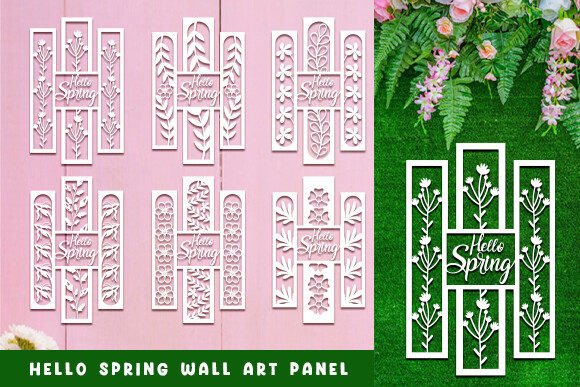
When working with laser cutters, CNC routers, or plasma cutters, the quality of your source file directly dictates the quality of the final product. Raster images often struggle with clean edges at scale, leading to jagged cuts or excessive processing time. This is where the Laser Cut Hello Spring Wall Art Panel SVG SET shines. By utilizing scalable vector graphics, you ensure that every curve of a blooming flower or every line of typography remains crisp, regardless of the final dimensions of the panel.
Vector files like SVG, EPS, and DXF define paths rather than pixels. This mathematical precision allows cutting machines to follow smooth trajectories, resulting in cleaner edges and faster production times. For professionals, this efficiency translates to lower material waste and higher throughput. For hobbyists, it means a smoother learning curve and fewer failed cuts due to poor file resolution.
Breakdown of Included File Formats
A comprehensive digital asset package should cater to various workflows and software preferences. The inclusion of multiple file types in this set ensures compatibility across different industries and skill levels. Here is what you typically get and how each format serves a specific purpose:
- SVG File: The standard for web-based design tools and many modern laser cutting software suites. It is lightweight and easily editable in programs like Inkscape or Adobe Illustrator.
- EPS File: A universal vector format preferred by professional graphic designers. It maintains integrity when imported into core design applications like CorelDRAW or Affinity Designer.
- DXF and DWG Files: Essential for users working in CAD environments. If you are using Autodesk AutoCAD or similar engineering software to prepare files for industrial-grade cutters, these formats are indispensable.
- HIGH PNG and JPG Files: While not used for cutting, these high-resolution raster images are crucial for previewing designs, creating marketing materials, or using the artwork in digital publications where vector editing is not required.
Practical Applications Across Industries
The versatility of the Laser Cut Spring Wall Art Panel SVG allows it to be applied in diverse contexts. Its utility extends beyond simple home decoration, offering value to educators, marketers, and entrepreneurs.
Retail and Commercial Display
Storefronts and interior retail spaces benefit greatly from seasonal updates. Spring-themed wall panels can serve as eye-catching backdrops for product displays or window decorations. Because the files are scalable, a retailer can produce a small countertop sign or a large floor-to-ceiling installation using the same source file. The intricate details possible with laser cutting add a premium feel to commercial branding, suggesting attention to detail and quality.
Educational and Community Projects
Educators in STEM and arts programs can use these files to teach principles of design, geometry, and manufacturing. Students can learn how to manipulate vector paths, understand kerf (the width of the laser cut), and experiment with different materials. The "Hello Spring" theme provides an approachable entry point for beginners, allowing them to focus on technical skills without getting bogged down in complex design creation from scratch.
Custom Event Decor
Wedding planners and event coordinators often seek unique, reusable decor elements. Laser-cut panels can be painted, stained, or left in their natural wood state to match specific color palettes. They work exceptionally well as photo booth backdrops, stage accents, or table centerpieces. The ability to quickly produce these items from digital files allows event professionals to offer customized solutions to clients with rapid turnaround times.
Material Considerations and Fabrication Tips
While the digital file is critical, the physical outcome depends heavily on material selection and machine settings. When using the Laser Cut Hello Spring Wall Art Panel SVG SET, consider the following practical factors:
- Material Thickness: Thinner materials like 3mm plywood or acrylic allow for finer details and tighter curves. Thicker materials may require adjustments to the design to prevent burn marks or incomplete cuts in tight corners.
- Kerf Compensation: Always account for the laser beam's width. If pieces need to fit together snugly, you may need to offset paths slightly in your CAD software. The included DXF files make this adjustment straightforward for technical users.
- Finish and Post-Processing: Laser cutting can leave charred edges on wood. Sanding or painting can mitigate this. For acrylic, masking tape applied before cutting can protect the surface from smoke residue, ensuring a pristine finish upon removal.
Enhancing Brand Identity Through Seasonal Content
For marketers and content creators, consistency is key. Using high-quality, professional-grade assets like these SVG sets helps maintain a cohesive brand image across seasons. Instead of relying on generic clip art, businesses can produce proprietary physical assets that reflect their unique aesthetic. This tactile approach to marketing—bringing digital designs into the physical world—creates memorable experiences for customers.
Furthermore, the ease of editing vector files allows for quick customization. You can add a company logo, change a phrase, or adjust colors to align with brand guidelines before sending the file to production. This flexibility supports agile marketing strategies where speed and relevance are paramount.
Selecting the Right Asset for Your Needs
When evaluating digital cut files, look for clean node structures. Poorly constructed vectors may have overlapping lines or unnecessary anchor points, which can confuse cutting software and lead to errors. The Laser Cut Spring Wall Art Panel SVG described here is optimized for smooth operation, reducing the need for extensive cleanup in design software.
Additionally, consider the complexity of the design relative to your machine’s capabilities. Intricate floral patterns look stunning but may require slower cutting speeds and higher precision optics. Ensure your equipment is calibrated correctly before attempting detailed cuts on expensive materials.
If you have any questions regarding file compatibility or specific design modifications, please send us a message. We are committed to supporting creators in achieving their best results. Thank you for visiting, and we hope these resources inspire your next project.