Choosing the Right Decorative Tree Wall Panel Template for Laser Cutting and CNC Projects
Creating intricate wall art has become increasingly accessible thanks to digital fabrication tools like laser cutters and CNC routers. Among the most popular designs in this space is the Decorative Tree Wall Panel Template. This specific type of digital file offers a blend of natural aesthetics and geometric precision, allowing makers to produce sophisticated "Tree of Life" motifs that serve as focal points in modern interior design. However, selecting the right template involves more than just picking an image you like. It requires understanding file formats, material constraints, layering techniques, and the practical realities of assembly.
This guide explores what makes a high-quality tree wall panel template distinct, how it compares to other decorative approaches, and what factors you should evaluate before downloading and cutting your design. Whether you are a hobbyist with a desktop laser cutter or a professional fabricator managing larger projects, understanding these nuances will help you achieve a polished final product.
Understanding the Multilayer Layout Approach
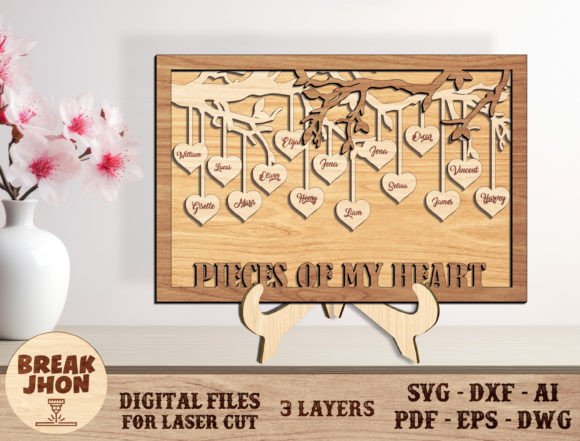
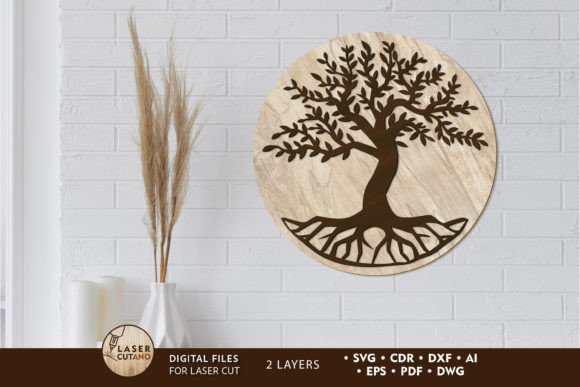
The defining characteristic of a premium Decorative Tree Wall Panel Template is its multilayer structure. Unlike simple single-layer cutouts that rely solely on silhouette, multilayer designs use depth to create visual interest. The specific TREE digital layout discussed here typically consists of two primary layers. This approach allows for a subtle 3D effect when the pieces are stacked and glued together.
In a two-layer system, the bottom layer often serves as a solid or semi-solid background, while the top layer contains the intricate details of the tree branches, roots, and surrounding elements. This separation is crucial for structural integrity. If all details were cut from a single thin sheet, delicate branches might break during handling or installation. By distributing the design across two layers of plywood, MDF, or acrylic, the final piece gains rigidity without sacrificing delicacy.
Furthermore, these templates often include engraving vectors. Engraving adds texture and shadow, enhancing the perception of depth without requiring additional physical layers. When evaluating a template, check if the engraving paths are clearly separated from the cut lines. This distinction ensures that your machine can switch between cutting and engraving modes efficiently, reducing production time and minimizing errors.
File Formats and Compatibility Considerations
One of the most significant advantages of purchasing a dedicated digital template is the variety of file formats provided. A comprehensive Decorative Tree Wall Panel Template package usually includes files in .AI, .SVG, .DXF, .DWG, .CDR, .EPS, and .PDF formats. This diversity is not merely a convenience; it is a necessity for compatibility across different software ecosystems.
- .DXF and .DWG: These are industry standards for CAD software and are widely supported by CNC router control programs. If you are using a CNC machine rather than a laser cutter, these formats are essential.
- .SVG and .AI: Scalable Vector Graphics and Adobe Illustrator files are ideal for laser cutting software like LightBurn, RDWorks, or LaserGRBL. They preserve vector paths cleanly, ensuring smooth cuts.
- .PDF and .EPS: These are useful for viewing the design at full scale before cutting or for sending to professional cutting services if you do not own a machine.
It is important to note that after payment, these files are typically delivered in a compressed .zip folder. Users must unzip the folder before attempting to open any individual files. Trying to access files directly from within a zip archive can sometimes lead to corruption or software errors, particularly with complex vector files like .AI or .CDR. Always extract the contents to a local directory first.
Material Selection and Thickness Tradeoffs
The choice of material significantly impacts the final appearance and durability of your tree wall panel. The recommended materials for this specific template include plywood, MDF, acrylic, plexiglas, and cardboard. Each option presents unique tradeoffs.
Plywood is the most common choice for wood art panels due to its natural grain and strength. For a finished product size of approximately 14.5 x 14.5 inches, a thickness of 3mm to 6mm (1/8in to 1/4in) is ideal. Thinner materials (3mm) allow for sharper detail in tight curves but may warp if not sealed properly. Thicker materials (6mm) provide a more substantial feel and better hide minor imperfections in the cutting edge, but they require more power from your laser or CNC spindle.
MDF offers a uniform surface without grain, making it excellent for painting. Since the instructions recommend painting each layer before gluing, MDF can result in a very clean, modern look. However, MDF produces more dust when cut and does not have the natural warmth of wood.
Acrylic and Plexiglas introduce a contemporary, glossy aesthetic. These materials are fantastic for catching light and creating shadows, but they require different cutting parameters than wood. Acrylic can melt if the laser speed is too slow, leading to fused edges. Additionally, acrylic is more brittle than wood, so handling the delicate branches of a tree design requires extra care during assembly.
Assembly Techniques and Finishing Tips
The success of a multilayer Decorative Tree Wall Panel Template relies heavily on the assembly process. The general rule is to paint or finish each layer individually before gluing them together. Attempting to paint the assembled piece often results in uneven coverage in the crevices where the layers meet.
When gluing, use a strong wood adhesive or acrylic cement, depending on your material. Apply the adhesive sparingly to avoid squeeze-out, which can ruin the finish. Clamping the layers evenly is critical to ensure that the alignment remains precise. Even a millimeter of shift can disrupt the visual symmetry of the tree design.
Another practical consideration is scalability. While you can increase the size of the design to create a larger statement piece, reducing the size requires caution. The template contains thin elements that may become too fragile if scaled down significantly. If you plan to make a smaller version, test cut a small section first to ensure the bridges and connections hold together. Conversely, scaling up may require thicker material to maintain proportionality and prevent sagging.
Comparing Digital Templates to Custom Design
Why choose a pre-made Decorative Tree Wall Panel Template instead of designing your own? The primary benefit is time efficiency and technical reliability. Creating a vector file that is optimized for laser cutting involves ensuring that all paths are closed, nodes are minimized, and kerf (the width of the laser beam) is accounted for. Pre-made templates have already undergone this optimization.
However, custom design offers unlimited creative freedom. If you have specific symbolic elements or dimensions that do not fit standard templates, designing from scratch may be necessary. For most users, especially those looking to produce consistent, high-quality wall art without investing hundreds of hours in learning advanced vector illustration, a professionally prepared template strikes the right balance between customization and convenience.
Additionally, consider the alternative of buying pre-cut wooden panels. While convenient, pre-cut options limit your ability to choose materials, finishes, and sizes. Using a digital template empowers you to control every aspect of the production process, from the type of wood stain to the exact dimensions that fit your wall space.
Decision Factors: Is This Template Right for You?
To determine if this specific TREE digital multilayer layout is the right choice for your project, consider the following factors:
- Equipment Capability: Do you have access to a laser cutter or CNC router capable of handling 3-6mm materials? Desktop diode lasers may struggle with thicker hardwoods, while CO2 lasers handle them with ease.
- Skill Level: Are you comfortable with basic assembly and finishing techniques? The multilayer nature requires patience in alignment and painting.
- Aesthetic Preference: Does the "Tree of Life" symbolism align with your design goals? This motif is versatile, fitting into bohemian, rustic, modern, and spiritual interior styles.
- Project Scale: Are you making a single piece for your home or producing multiple units for sale? The downloadable format allows for unlimited reproduction, making it cost-effective for small businesses.
In conclusion, a Decorative Tree Wall Panel Template is a powerful resource for creators looking to blend natural beauty with digital precision. By understanding the file formats, material requirements, and assembly best practices, you can transform a simple digital download into a captivating piece of wall art. Whether you choose plywood for its warmth or acrylic for its modern sheen, the key lies in careful preparation and attention to detail. Evaluate your tools and goals, and let the template serve as a foundation for your creative expression.